Lead Generation Quiz
18 Min Read
Learn how to use a lead generation quiz to engage website visitors, collect valuable customer insights, qualify prospects, and generate better-quality leads.
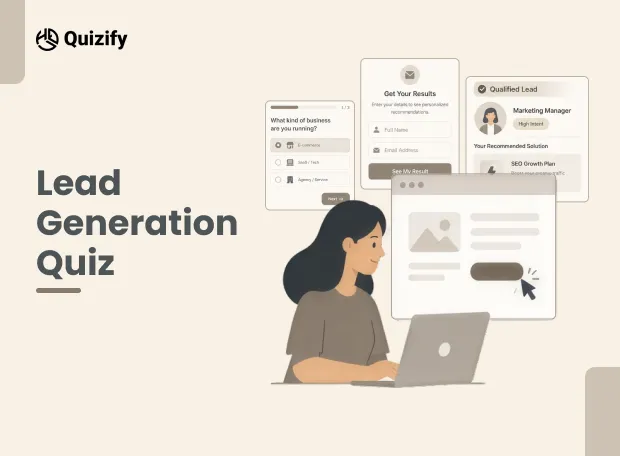
Getting someone to fill out a long lead form is not always easy. Asking for a name, email, phone number, company size, budget, and several other details can make visitors leave before they even start.
A lead generation quiz takes a different approach.
Instead of asking visitors to fill out a form straight away, you give them something useful to do. They answer a few questions, discover something about themselves or their needs, and receive a relevant result. At the same time, your business learns more about the person behind the click.
That makes a quiz more than an engagement tool. When it is planned properly, it can become a practical part of your lead generation strategy.
With Quizify, you can build quizzes, forms, surveys, and other interactive funnels without coding. You can also use AI to create a funnel, add Logic Jumps, customize results, connect marketing tools, and track how people move through the funnel.
What is a lead generation quiz?
A lead generation quiz is an online quiz designed to gather the contact information of potential customers and also learn more about them.
For instance, a digital marketing company may create a lead generation quiz named: “How good is your SEO strategy currently?”
This quiz can have the following questions:
What kind of business are you running?
How much traffic is generated by your website?
What is your main SEO issue?
How often do you post content?
How often do you publish content?
After answering the questions, the visitor can enter their name and email address to see their result.
The agency now has more than an email address. It also has some basic information about the person's business and needs.
Why use a quiz instead of a normal lead form?
A normal lead form usually asks for information such as name, email, phone number, company, or job title.
There is nothing wrong with this approach. The problem is that people see these forms everywhere. A form with several empty fields can feel like work, especially when the visitor does not yet know what they will get in return.
A quiz gives the visitor something to do first.
Standard lead form | Lead generation quiz |
Mainly collects contact details | Collects contact details and answers |
Usually has static fields | Uses questions and answer choices |
Gives little information to the visitor | Can provide a result or recommendation |
Often asks for information upfront | Can build interest before lead capture |
Limited segmentation | Answers can help segment leads |
A quiz is not always more effective than a form; it all depends on your target group and your purpose. If you just need the email address of a person for a newsletter, a brief form will do. If you want to know what the potential customer wants, then a quiz is a better choice.
How does a lead generation quiz work?
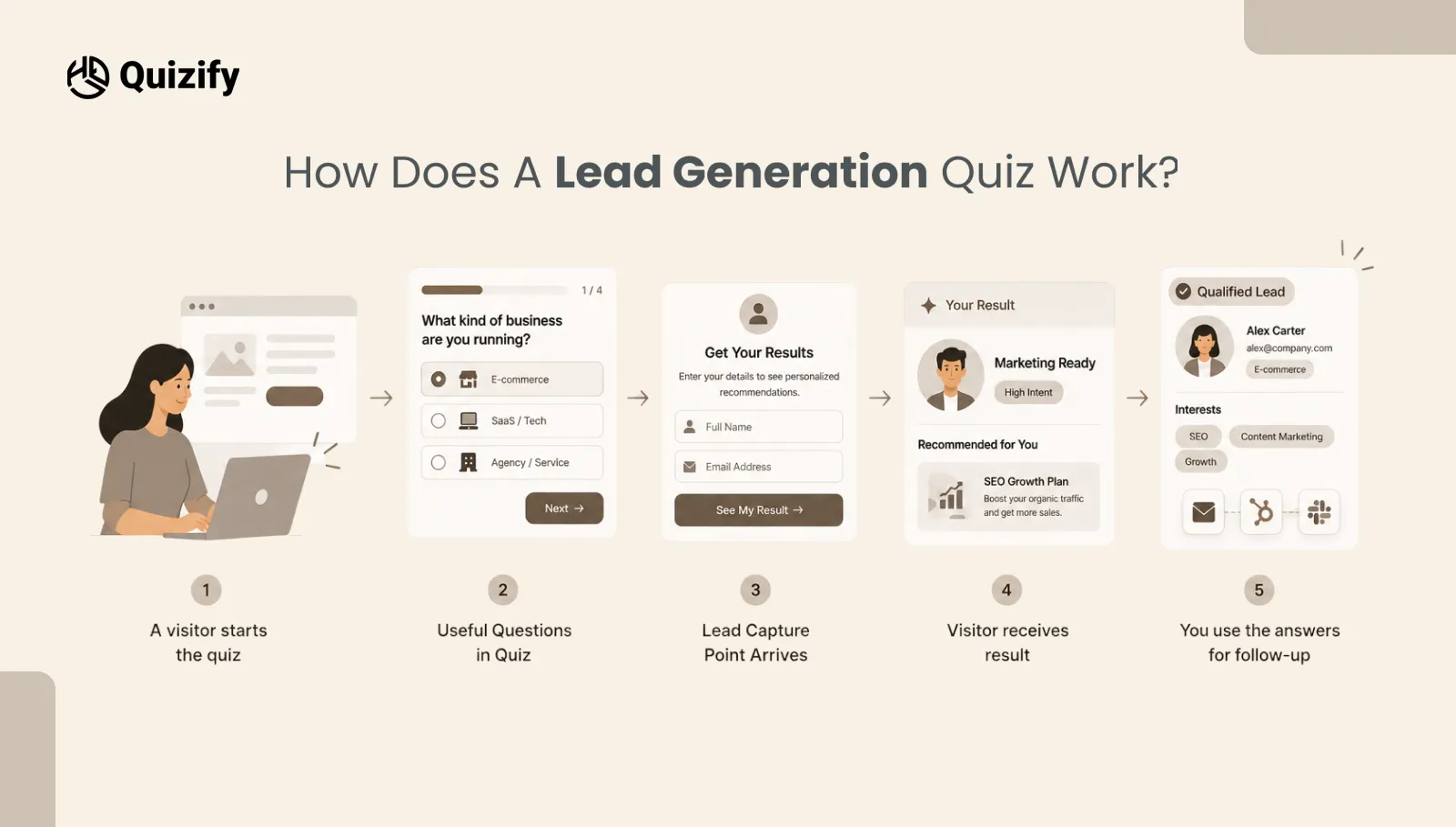
The basic process is quite simple.
Step 1: A visitor starts the quiz
The first question should be easy to answer. Start with an easy question so visitors feel comfortable continuing.
Step 2: Useful Questions in Quiz
Your questions must ensure that you gain some knowledge about your business.
Step 3: Lead Capture Point Arrives
At this stage, you can ask visitors for their information, such as their name, email address, phone number, or company name. Depending on your goal, you can choose which details to collect.
Step 4: Visitor receives result
Once the quiz is complete, the visitor receives a result based on their answers. For example, the result may include a score, category, recommendation, or explanation.
As a result, visitors get something useful from the quiz instead of simply submitting their information.
Step 5: You use the answers for follow-up
The collected information can be sent to your marketing or sales tools so you can decide what to do next. Do not add questions simply because you can.
Start with one clear goal
Before writing questions, decide what you want the quiz to achieve.
For example, your goal could be:
Find people who need your service
Recommend the right product
Understand customer needs
Separate high-intent leads from casual visitors
Build an email list
Find out which service a visitor needs
Help sales teams understand new enquiries
Your goal will affect the questions you ask.
Suppose you run a web design agency. Asking someone their favourite website colour may be interesting, but it may not help you qualify the lead.
A better question could be:
“What do you want to improve on your current website?”
The answers might include:
Website design
Website speed
Mobile experience
Conversions
Online store features
Now the answer gives you information that can be used later.
Ask questions that help you understand the lead
A good lead generation quiz should not feel like a long customer survey.Every question should have a reason.Think about the information your sales or marketing team would actually use.
For example, a software company might ask:
What type of business do you run?
How many people are on your team?
What are you currently using to manage this process?
What is your biggest problem with your current setup?
These questions can show you about the visitor's business, current situation, problem, and buying timeline.
You do not need 15 or 20 questions to get useful information. A shorter quiz with better questions is often easier to complete.
Keep the questions easy to answer
Use simple wording.
Instead of:
“Which of the following best describes the primary operational challenge currently affecting your organisation?”
Try:
“What is your biggest challenge right now?”
The second version is easier to understand and takes less effort to answer.
Use quiz logic to show relevant questions
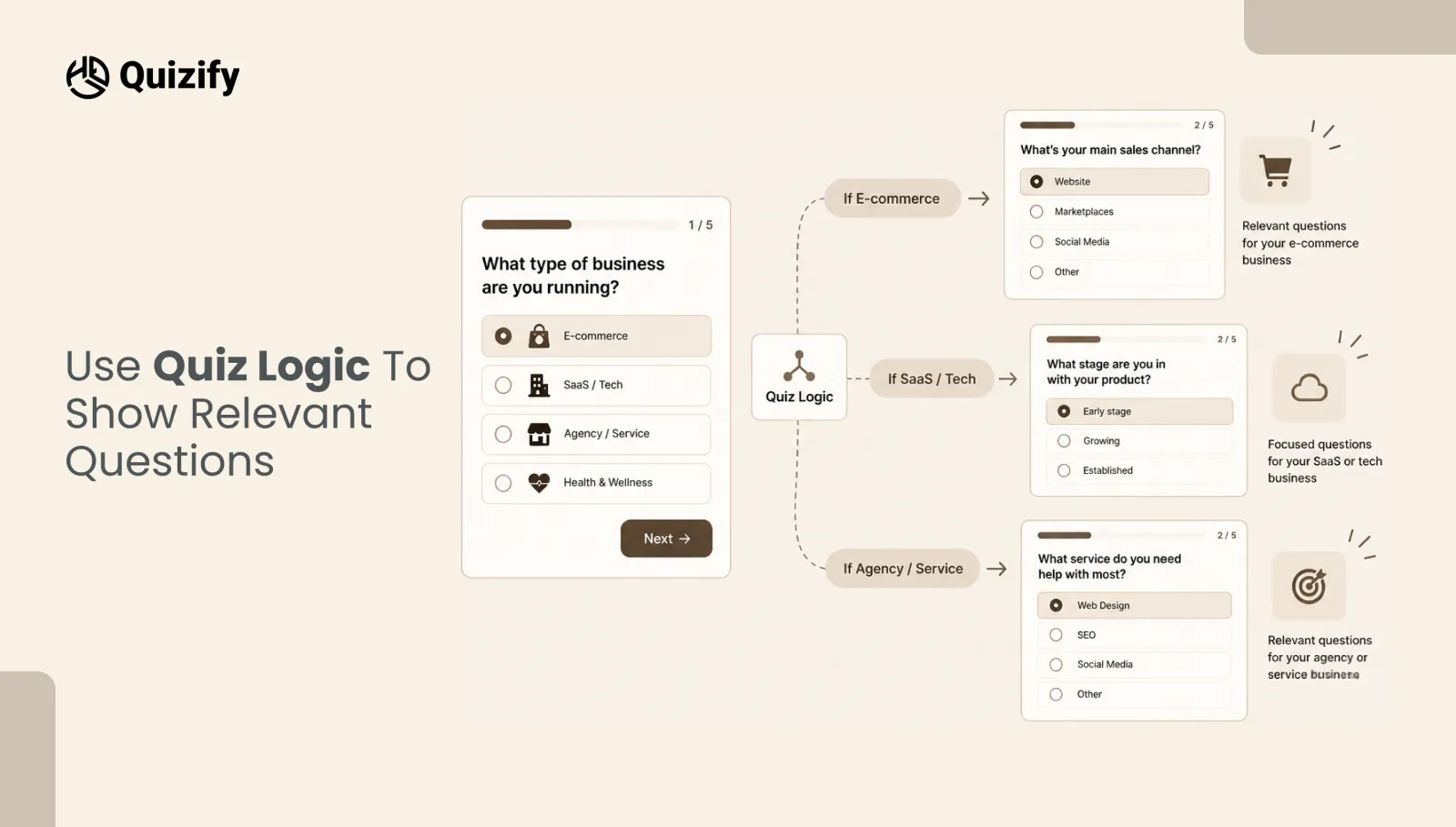
Not every visitor needs to see the same questions. This is where logic can make a difference. For example, imagine a company that sells both SEO and paid advertising services.
The first question could ask:
“What do you want to improve?”
If the visitor selects Organic traffic, they can see SEO-related questions.
If they select Paid advertising, they can see questions about ad campaigns and budgets.
This keeps the quiz more relevant.
Quizify supports Logic Jumps, which can be used to create different paths based on a person's answers. Its current builder also supports quizzes, forms, surveys, and assessments.
The goal is not to create complicated logic. The goal is to avoid asking people questions that do not apply to them.
Decide when to ask for contact details
One common question is where the lead capture form should appear. There is no single answer that works for every quiz.
You can ask for contact details:
At the beginning
In the middle
Before showing the result
At the end
For many lead quizzes, asking for contact details after the visitor has answered some questions can make sense. By then, they have already spent time on the quiz and understand what they are going to receive.
For example:
“Your result is ready. Enter your email to see your full report.”
This is more specific than simply saying:
“Enter your email address.”
The visitor should understand why you need their information.
At the same time, do not hide the lead capture step behind a long quiz just to increase form submissions. If the quiz takes too long, people may leave before reaching it.
Give visitors a useful result
The result is an important part of the quiz. If someone answers five or six questions and only sees:
“Thanks for completing the quiz.” the experience ends without much value.
Instead, give them something connected to their answers.
For example:
Your result: You need a stronger content strategy
Your answers suggest that your website gets some traffic, but your content is not bringing enough relevant visitors.
Start by reviewing your existing pages and identifying topics your customers search for. Then you could add a relevant CTA such as:
“Get a free content review”
The result does not need to be complicated. It just needs to make sense based on the answers. Quizify supports result-based funnels, including basic results, score-based results, and category matching.
Use answers to group your leads
One useful part of a lead generation quiz is the information you collect before the sales conversation begins.
You can use quiz answers to group people into different categories.
For example:
Lead type | Possible quiz answers | Follow-up |
Ready to buy | Has a clear problem and short timeline | Sales call |
Researching | Knows the problem but needs information | Educational email |
Needs guidance | Not sure which option is right | Consultation |
Low intent | Just exploring options | Newsletter or helpful content |
This does not mean every person needs a different campaign. However, basic segmentation can help you avoid sending the same message to everyone.
Someone who says they need a solution this month probably needs a different follow-up from someone who is only researching.
How to create a lead generation quiz with Quizify
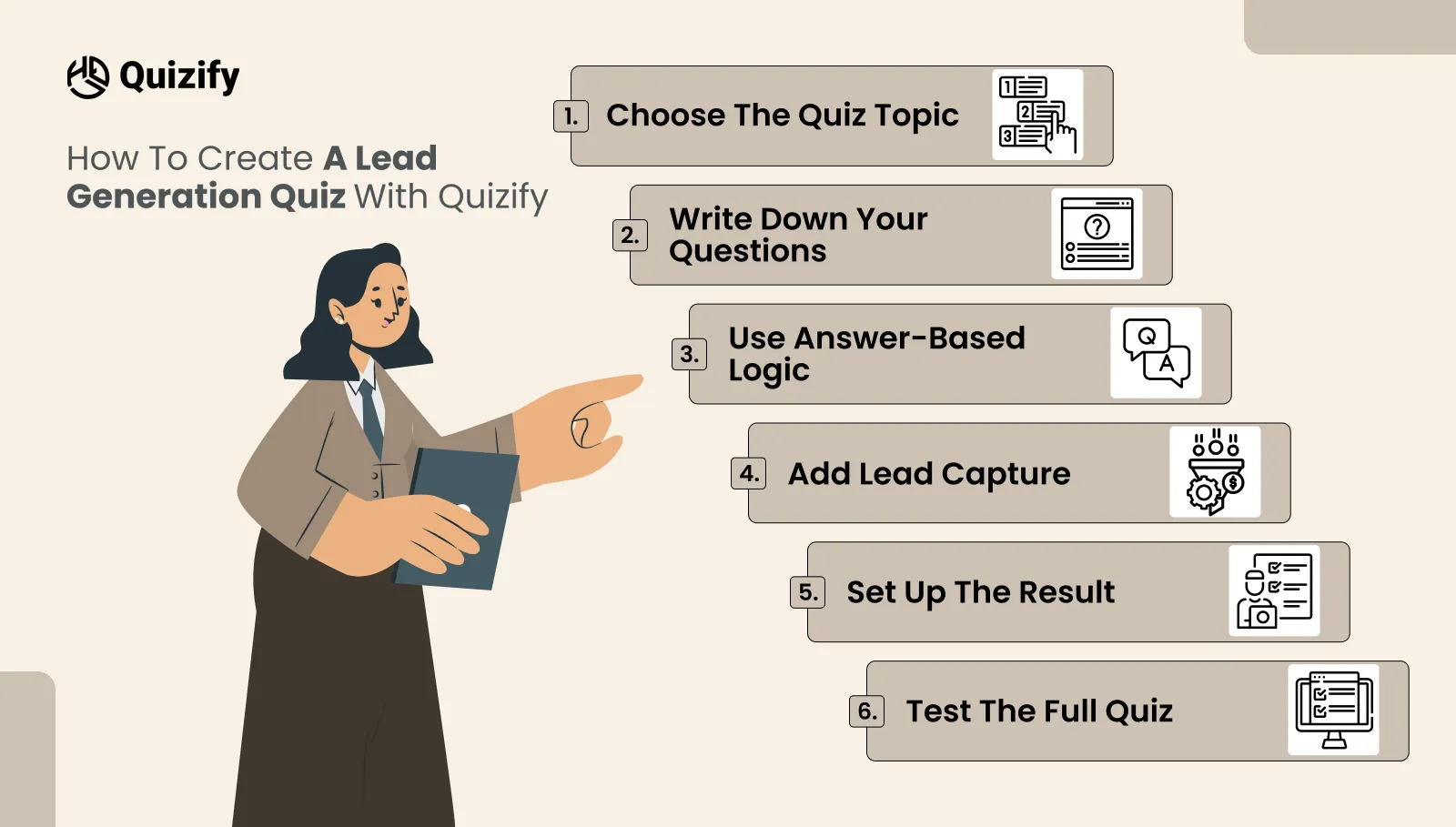
Quizify gives you several ways to start building a funnel. You can start from scratch, use a template, create one with its AI builder, or import existing questions.
Here is a simple process you can follow.
1. Choose the quiz topic
Start with a problem your audience already has.
Some examples are:
Which product is right for you?
What type of marketing does your business need?
How ready is your business for automation?
What is stopping your website from converting?
Which service package fits your needs?
The topic should be clear from the start.
2. Write down your questions
Ensure the questions are only based on the information that you are seeking. Do not ask for any personal data if it is not going to help in qualifying your leads.
3. Use answer-based logic
In case the answers are different, and the questions needed are different, use logic to determine the path to take.
4. Add lead capture
Choose which contact details you actually need. For many campaigns, name and email may be enough. A phone number or company name can be added when there is a clear reason to collect it.
5. Set up the result
Create a result that matches the quiz answers. This could be a recommendation, score, category, or short explanation.
6. Test the full quiz
Go through the quiz yourself. Check every answer path, lead form, result, button, and email connection before publishing.
Connect the quiz to your existing tools
Collecting leads is only part of the process. You also need to decide what happens after someone submits the quiz.
Quizify supports integrations with tools such as Mailchimp, Klaviyo, Omnisend, ActiveCampaign, HubSpot, Zapier, Make, Google Sheets, webhooks, and others.
For example, you could use a quiz to:
Quiz answer → Lead captured → Contact added to your marketing tool → Relevant follow-up
This can save your team from manually checking every response.
It also means the information collected from the quiz has a place to go after submission.
Find Where People Drop Off
Do not only look at the number of leads you get. Look at how people move through the quiz.
For example:
1,000 people start
800 answer the first question
650 reach the lead form
400 submit their details
The numbers show you where people are leaving. If many people leave after one particular question, that question may be confusing, unnecessary, or too difficult to answer.
Quizify includes analytics and drop-off tracking, which can help you see where users stop completing a funnel. You can then make small changes instead of rebuilding the whole quiz.
Lead generation quiz ideas for different businesses
A quiz can work for many types of businesses. The questions simply need to match the buying process.
E-commerce
“Which product is right for you?”
Ask about preferences, budget, use case, size, or product requirements.
Marketing agency
"What do you need from your marketing strategy currently?"
Inquire about traffic, leads, content, advertising, and current issues.
SaaS firm
"Is your current software configuration serving your team well?"
Inquire about team size, current software, issues, and desired functionality.
Real estate
"What kind of property are you searching for?"
Inquire about location, property type, budget, and purchase timeframe.
Education firm
"Which course fits you best?"
Inquire about experience, interests, career aspirations, and preferred mode of education.
Consultancy
“What is your biggest business challenge?”
Use the answers to understand what type of support the visitor may need.
Mistakes to avoid when creating a lead quiz
A quiz can collect a lot of information, but more questions do not always mean better leads.
Here are some common problems to avoid.
1.Asking too many questions
A visitor may be willing to answer five questions but not fifteen. Remove questions that do not help you understand the lead.
2.Asking for too much personal information
Do not ask for a phone number, company size, address, or other details unless you have a reason to use them.
3.Making every question required
Some questions may not apply to everyone. Give visitors a simple way to continue when an answer is not necessary.
4.Making the result too general
If the result could apply to almost anyone, the quiz has not done much work. Use the answers to make the result more specific.
5.Hiding the purpose of the quiz
People should know what they are going to get. A title such as “Find the right plan for your business” tells them more than “Take our quiz.”
6.Forgetting mobile users
Many people will open the quiz on their phone. Check the layout, buttons, question length, and form fields on smaller screens before publishing.
Lead generation quiz vs. lead form: which one should you use?
Both can work. The right option depends on what you need.
Use a lead form when:
You only need basic contact information
The offer is already clear
You want a very quick submission
You do not need much qualification
Use a lead generation quiz when:
You need more information about the visitor
Different customers have different needs
want to recommend different products or services
You want to segment leads
Want to give the visitor a useful result
You can also use both.
For example, a landing page can have a short form for visitors who are ready to contact sales and a quiz for people who need help deciding what they need.
How to improve your quiz over time
Your first version does not need to be perfect. Once the quiz is live, look at the responses and completion data.
Ask yourself:
Which questions are people skipping?
Where are people leaving?
Which results are most common?
Which quiz answers are linked to good leads?
Are people completing the lead form?
Are sales teams getting useful information from the answers?
Use this information to make small changes.
You may find that removing one question improves completion. You may also discover that one answer gives your sales team a strong signal about buying intent.
That is more useful than simply looking at the total number of leads.
Build a lead generation quiz around the customer
A good lead generation quiz should not feel like a long form with a few extra steps.
Start with a question your audience cares about. Keep the questions simple. Use conditional logic when it makes the experience easier. Ask for contact details when there is a clear reason. Then give the visitor a result that is actually useful.
For businesses, the value is in what happens after the quiz.
The answers can help you understand who the lead is, what they need, and what kind of conversation may be useful next.
With Quizify, you can build the quiz, add logic and result rules, collect leads, connect your existing tools, and check how people move through the funnel.
The main goal is simple: do not build a quiz just to collect more emails. Build one that gives you better information and gives the visitor a useful reason to share it.
Similar Topic
Free Customer Feedback Survey Template
Getting started does not have to be complicated.Quizify includes a ready-to-use customer feedback survey template so you do not have to build one from scratch. It is designed to:



FAQ
Frequently Asked Questions
What is a lead generation quiz?
Lead generation quiz is a questionnaire that asks for contact details along with questions related to needs, interests, preferences, or circumstances of the visitor.
What kind of questions should I ask in my lead generation quiz?
Asking questions to understand better the needs and context of the purchase of a customer. This might be related to his goals, problems, budget, preferences, business model, or timeframe.
How many questions should I put in my lead generation quiz?
There is no exact number of questions. The shorter the quiz, the better, but it should still include enough information. Eliminate questions that are not needed for qualifying and segmenting the customer and for the end result.
Where do I position the lead capture form?
You can put it in the beginning, middle, or end section of the quiz. The usual way is to ask for their contact information after the person has provided enough answers to get the value of the quiz result.
Is it possible to make a lead generation quiz without coding?
Yes. The platform Quizify offers no-code funnel builder, templates, AI-driven quiz creation, logic, customization, lead capture, and publishing capabilities, so there is no need to code the quiz.
Is it possible to use a lead generation quiz for qualifying leads?
Yes. The questions regarding their needs, business, budget, timeline, or current situation can help understand whether the person is a good lead and what they might need next.