Lead Generation Survey
18 Min Read
Create an engaging lead generation survey to understand your audience, capture qualified leads, and guide prospects toward the right products or services.
A name and email provide information about the identity of a visitor. Much more information can be gained from answers to questions asked. The information gained through a lead generation questionnaire helps find out what needs they have, what they are searching for, and whether they would be suitable for your company.
You should ask several questions related to their needs, desires, aims, or problems rather than just fill out a standard contact form. This way you get contact information, which also provides some valuable information about the person.
More importantly, the survey doesn't need to become a sales-oriented questionnaire. It could be a brief and practical exchange, giving something back to the visitor, whether a recommendation, a result, a quote, a consultation, or any insight.
With Quizify, one can create surveys, questionnaires, and quizzes in the same funnel builder. Moreover, one can use the conditional logic, result pages, analytics, integration features, and publishing methods to design an effective lead generation funnel.
What Is a Lead Generation Survey?
A lead generation survey is an online survey designed to collect both useful responses and contact information from potential customers.
A normal survey may ask questions only to collect opinions or feedback. A lead generation survey has another purpose. It helps you learn about a potential customer while giving you a way to follow up with them.
For example, a digital marketing agency could ask:
What is your main marketing goal?
How large is your current website?
Which marketing channel are you using now?
What is your biggest challenge?
When are you planning to improve your marketing?
At the end, the survey can ask for the person's name and email address.
Now the business does not only have an email address. It also knows what the person needs.
That small difference can make the next conversation much more useful.
Why Use a Survey Instead of a Basic Lead Form?
A traditional lead form usually asks for basic information such as name, email, phone number, and company.
That works for some campaigns. However, it does not tell you much about the person behind the submission.
A lead generation survey adds another layer. You can use questions to understand what the visitor wants before your sales team contacts them.
Basic Lead Form | Lead Generation Survey |
Name and email | Name, email, and useful answers |
Mostly collects contact details | Collects contact and qualification data |
Same path for everyone | Can create different paths |
Limited customer context | Better understanding of customer needs |
Follow-up starts from scratch | Follow-up can use survey responses |
Usually short and direct | Can be interactive and personalized |
However, this does not mean a survey should be long. A long survey can create the same problem as a long form.
The goal is to ask the right questions, not as many questions as possible.
What Makes a Lead Generation Survey Work?
A good survey has a clear reason for people to complete it. Someone should understand why they are answering your questions and what they will get after completing them.
For instance, you can choose among:
Personalized suggestion
Free consultation
Price quotation
Evaluation or scoring
Product suggestion
Useful report
Discount
Access to resource
On the other hand, it is important for the questions to be relevant to the business objective.
If you have a business of designing websites, asking the person his favorite color will not help you qualify the lead.
Instead, ask about their website, business size, goals, budget range, or project timeline.
The questions should help you understand whether the person is a good fit.
Lead Generation Survey Questions You Can Ask
The best lead generation survey questions depend on what you sell and who you want to attract.
Still, you can divide them into a few simple groups.
1. Understand Their Goal
Start with questions that help you understand what the visitor wants.
Examples:
What are you hoping to achieve?
What is your main goal right now?
Which area would you like to improve?
What result would make this project successful?
These questions are useful because they reveal intent.
2. Find Their Main Problem
Next, ask about the problem they are trying to solve.
For example:
What is your biggest challenge right now?
What is stopping you from reaching your goal?
Which part of your current process takes the most time?
What would you like to improve first?
These answers can also help you group leads by their needs.
3. Understand Their Current Situation
You may also need some background information.
For example:
What tool are you currently using?
How many people are on your team?
How many customers do you serve?
Do you often run this process?
Have you used a similar service before?
This information can make the lead more useful to your sales or marketing team.
4. Ask About Buying Intent
If your goal is sales, you can ask questions that show how close someone is to making a decision.
Examples include:
When are you planning to get started?
Are you currently comparing solutions?
What is your expected budget?
Would you like to speak with someone?
What type of solution are you looking for?
Do not ask every question in one survey. Choose the ones that matter for your sales process.
When Should You Ask for Contact Details?
This is one of the most important decisions when creating a lead generation survey.
If you ask for an email address before the visitor has seen any useful content, they may leave.
Instead, consider allowing the visitor to answer a few questions first.
For example:
What is your main goal?
How soon do you want to improve this?
What is your biggest challenge?
What solution are you currently using?
Then: Get your personalized result by entering your email.
This approach gives the visitor a reason to continue.
Quizify's documentation also recommends placing user information fields toward the end of the funnel so people are not asked for their information before they have engaged with the content.
Use Conditional Logic to Keep the Survey Relevant
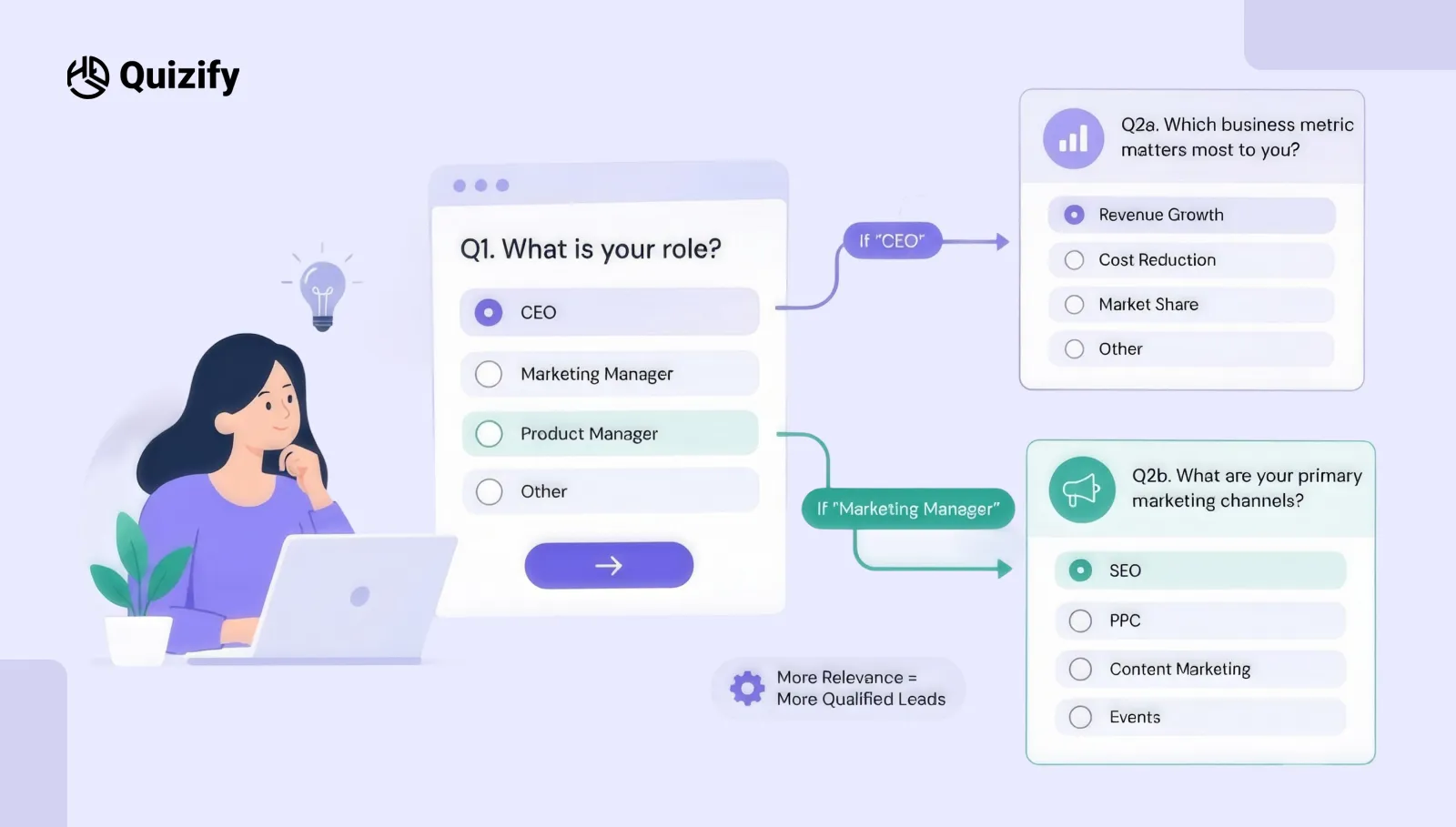
Use Conditional Logic to Make Sure the Survey is Relevant. Each person who comes to the survey will not necessarily have to answer all the questions.
Let’s take an example when you design a survey for a software company.
Questions:
What kind of business are you running?
E-commerce
Agency
SaaS
Local Business
Based on the respondent’s choice, you can display questions about products, orders, and sales if they choose “E-commerce.” On the other hand, if they choose “Agency,” you can ask about their clients and number of employees. This way, each respondent gets questions that match their business.
That is where conditional logic becomes really handy. With Quizify’s Logic Jumps feature, you can direct respondents to different questions based on their answers. For example, you can hide certain slides, show specific questions, or even end a funnel based on what someone selects.
As a result, people do not have to answer questions that are not relevant to them. Instead, they can move through a survey that matches their needs. This not only saves respondents’ time but also makes the survey more relevant and easier to complete.
An Example
Here is how a branching survey can look like:
Question | Answer | Next Step |
What are you selling? | Products | Ask about product range |
What do you sell? | Services | Ask about service type |
What do you sell? | Both | Ask about both |
How soon do you need help? | Now | Show consultation CTA |
How soon do you need help? | Later | Offer useful resource |
The survey becomes more like a conversation than a fixed list of questions.
How Quizify Can Help You Build a Lead Generation Survey
Quizify is built around interactive funnels, so you can use more than one type of interaction in the same lead generation process.
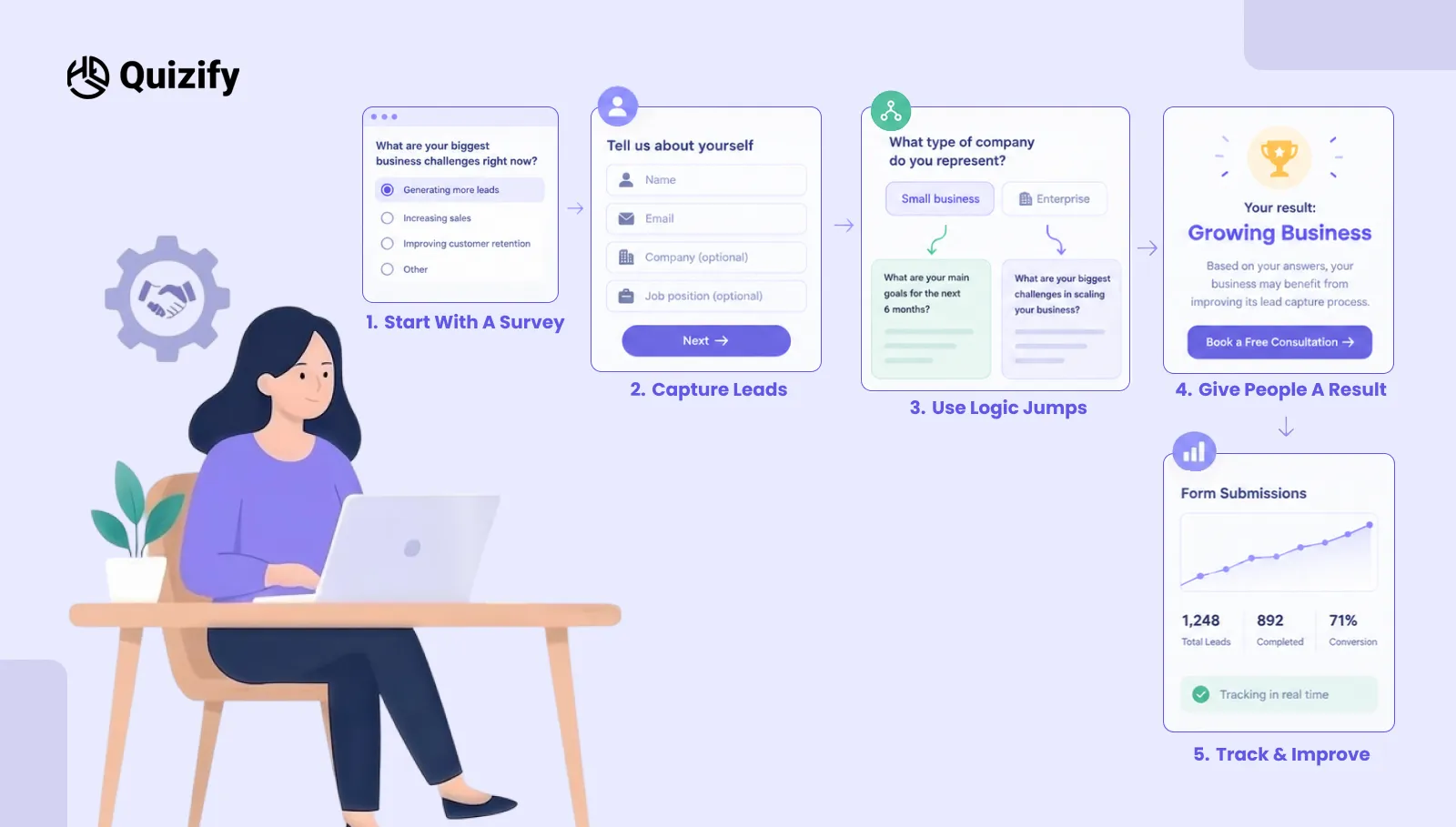
You can create a survey, add questions, collect user information, construct logic, set the result, publish the funnel, and track the form submissions.
Currently, Quizify allows creating quizzes, forms, surveys, and assessments with various purposes depending on the selected type of funnel.
In case of lead generation, it means that either a survey or something more engaging can be created.
Begin With a Survey
Use a survey in case you want to learn more about your audience.
For example, you could ask them about...
Customer needs
Buying preferences
Business issues
Product interests
Services requirements
Future projects
And then add the necessary contact fields.
Capture Leads
A few questions down the line, add such fields as...
Name
Email
Phone number
Company
Job position
And only ask for the information that will be really used.
For example, if your sales people do not call your leads, there is no need to make a phone number a mandatory field.
This keeps the experience simple.
Use Logic Jumps
Use Logic Jumps when different answers should lead to different questions. This is especially useful when your audience includes different customer types.
For example, a B2B company could send small businesses down one path and enterprise companies down another.
Give People a Result
A survey does not have to end with a plain Thank you. Quizify supports basic results, score-based results, and category-match results for its quiz, form, and survey funnels.
For example, you could show:
Your result: Growing Business
Based on your answers, your business may benefit from improving its lead capture process.
Then add a button:
Book a Free Consultation
This gives the visitor a clear next step.
Turn Survey Answers Into Lead Qualification
One of the biggest benefits of a lead generation survey is that the answers can help you decide which leads deserve faster attention.
For example:
Survey Answer | Possible Lead Category |
Needs a solution immediately | High intent |
Planning within 3 months | Warm lead |
Just researching | Early-stage lead |
Large team or business | Higher-value opportunity |
Clear project requirement | Strong fit |
No current need | Nurture |
These categories should match your own sales process. The important point is that the survey gives you information before the sales conversation begins.
Instead of starting with, "How can we help you?", your team can start with something more useful.
For example:
Thanks for completing our survey. You mentioned that your main challenge is generating qualified leads. We'd like to show you a few ways you can improve that process. That is a much more relevant conversation.
Keep the Survey Short
A common mistake is trying to collect everything in one survey.
You may want to know:
Their name
Email
Phone
Company
Industry
Revenue
Team size
Budget
Location
Goals
Challenges
Timeline
But asking all of these questions at once can make the survey feel like work.
Instead, decide what information you really need.
A simple lead survey may only need five to eight useful questions.
You can always collect more information later.
A Practical Lead Survey Structure
A good lead survey should feel like a simple conversation, not a long list of questions. Here is a practical structure you can follow:
Step | What to Ask | Why It Matters |
1. Start simple | “What are you looking for?” | Gives visitors an easy question to answer without asking for personal details right away. |
2. Find the pain point | “What is your biggest challenge right now?” | Helps you understand what the visitor actually needs help with. |
3. Get some context | “What are you using at the moment?” | Shows what they already have and where there may be a gap. |
4. Check their timeline | “When are you planning to get started?” | Helps you separate people who are ready now from those who are still exploring. |
5. Give them something useful | “Based on your answers, here’s what we recommend.” | Gives visitors a reason to complete the survey instead of making it feel like a sales form. |
6. Ask for contact details | “Where should we send your results?” | Makes the lead form feel connected to the value they are about to receive. |
7. Keep the conversation going | “Want to discuss your recommendation?” | Gives interested visitors a clear next step, such as booking a call or getting a quote. |
This gives the visitor a reason to complete the process.
Where Can You Use a Lead Generation Survey?
You do not have to keep your survey on one landing page. Instead, you can publish it in different places based on where your visitors are. For example, Quizify supports direct links, website embeds, popups, brand URLs, and QR codes. As a result, you can share the same survey across different channels without creating a separate funnel for each one.
That gives you several options.
Website
Place the survey on a landing page, service page, product page, or blog. For example, a web design agency could add: Not sure what your website needs? Take our 2-minute website survey.
Email Campaigns
Send the survey to an existing audience to learn more about their needs. For example: Tell us what you are working on and get a recommendation.
Social Media
Use the survey as the destination for a social media campaign. Instead of sending visitors to a generic homepage, send them directly to an interactive experience.
Paid Campaigns
A survey can also be used after an advertisement.
For example:
Ad → Survey → Result → Lead Capture → Sales Follow-Up
This gives visitors a clear journey instead of sending them to a general page.
Events and Offline Campaigns
QR codes can connect printed material to a digital survey.
You could place one on:
Business cards
Event stands
Brochures
Product packaging
Printed advertisements
Connect Your Leads to the Tools You Already Use
Collecting leads is only the first part. You also need to decide what happens after someone submits the survey.
Quizify currently supports integrations including HubSpot, Zapier, Make, Google Sheets, Slack, Webhooks, Google Analytics, Facebook Pixel, Calendly, TidyCal, and GoHighLevel, among others.
For example, your workflow could look like this:
Visitor completes survey
↓
Quizify collects responses
↓
Lead goes to your CRM
↓
Sales team receives the information
↓
Lead gets the right follow-up
You can also send submission data to Google Sheets or use automation tools to connect the survey with other parts of your workflow.
This reduces the need to manually copy information from one system to another.
Track More Than the Number of Leads
A survey can collect hundreds of responses and still perform badly.
You need to look at what happens throughout the funnel.
Quizify's analytics can help you review participant activity, submissions, performance, and where people drop off.
Look at metrics such as:
Funnel views
Completed surveys
Completion rate
Drop-off points
Lead submissions
Common answers
Lead quality
Conversion to the next step
For example, if many people leave after the fourth question, check that question first.
Maybe it is too difficult. Maybe it asks for information people do not want to share. Or maybe it simply does not feel relevant.
The numbers can help you find the problem.
How to Create a Lead Generation Survey With Quizify

Step 1: Decide What You Want to Learn
Who is my ideal lead?
What problem do they have?
What information will help me qualify them?
What action should they take after the survey?
Step 2: Create Your Survey
Quizify lets you create surveys using its funnel builder. You can also use its AI Funnel Builder by describing the survey you want to create, then reviewing and changing the generated structure.
You can still edit the questions, answer choices, fields, and other settings.
Step 3: Add Relevant Questions
Start with easy questions. Ask the questions that allow you to understand the requirements of the visitor. If you do not need to know personal information at this point, skip this step.
Step 4: Add Logic
Add Logic Jumps for situations when you need to ask different questions based on answers. For example, for people who have selected a specific option you can ask a certain set of questions. Test all possible paths before the launch of the form.
Step 5: Add Lead Capture Fields
Add lead capture fields (such as name, email, phone number) that you want to receive. Do not add any unnecessary fields.
Step 6: Create the Result
Choose what should the visitor get in the end. This can be a recommendation, score, category, useful resource, or other result.
Step 7: Connect Your Workflow
Integrate the form with the tools that you use for the management of leads. It can be an automatic addition to your CRM or Google Sheets, notification in Slack, etc.
Step 8: Test Before Publishing
Take the survey yourself and try different answers.
Check that:
All questions appear correctly
Logic Jumps take visitors to the right questions
Lead details are saved
The right result appears
Integrations work
The survey works well on mobile
The final CTA works
It is also worth checking the survey on different devices before you publish it.
Lead Generation Survey Best Practices
If you want better results, keep these points in mind.
Give People a Reason to Finish
Do not make the survey feel like unpaid work. Tell people what they will get.
Ask One Useful Question at a Time
Too many questions on one screen can make the survey feel crowded. A simple flow is easier to follow.
Keep Questions Relevant
If a question does not help you understand the lead or improve their experience, remove it.
Do Not Collect Too Much Data
More fields do not automatically mean better leads. Collect useful information, not everything you can think of.
Make the Result Useful
A personalized result can give people a reason to complete the survey and take the next step.
Test Your Logic
A broken branch can send people to the wrong question or result. Always test different answer combinations.
Make It Mobile Friendly
Many visitors will complete surveys on their phones. Check buttons, text, fields, and question layouts on smaller screens.
Lead Generation Survey vs. Lead Generation Quiz
Surveys and quizzes can both be used to collect leads. The main difference is what you want to learn from the visitor and what you want to give them in return.
Lead Generation Survey | Lead Generation Quiz |
Mainly collects information | Uses answers to provide a result |
Asks about needs, opinions, or problems | Can be used for recommendations or qualification |
Gives you more information about the visitor | Gives the visitor something based on their answers |
Works well for customer research | Works well for product or service recommendations |
Can also be used to qualify leads | Can collect leads while keeping the process interactive |
You do not necessarily have to pick one format.With Quizify, you can create both surveys and quizzes in the same funnel. You can choose the one that fits what you want to do.
For example, a skincare brand can use a quiz to recommend products based on a customer's answers. A software company can use a survey to ask about the problems a potential customer is facing.
In simple terms, a survey is useful when you want to collect information, while a lead generation quiz works well when you want to ask questions and give the visitor a result.
Final Thoughts
A lead generation survey should do more than collect names and email addresses. Instead, it should help you understand the people who are interested in your business. At the same time, the best surveys keep the process simple. For example, they ask useful questions, remove irrelevant steps, and, as a result, make the experience easier for visitors. In addition, they can give people something valuable at the end, which can encourage them to complete the survey.
With Quizify, you can bring all these pieces together in one funnel. First, create a survey and collect lead information. Then, use conditional logic to show relevant questions based on each answer. Next, show personalized results and, at the same time, connect your data to other tools. Finally, review how people move through the funnel so you can understand what works and, if needed, make improvements.
Similar Topic
Free Customer Feedback Survey Template
Getting started does not have to be complicated.Quizify includes a ready-to-use customer feedback survey template so you do not have to build one from scratch. It is designed to:



FAQ
Frequently Asked Questions
What is a lead generation survey?
Lead generation survey is a survey where along with personal contact information, data about potential customer needs, preferences, goals, or challenges is collected. Answers to such questions may be used by businesses to qualify leads and organize more appropriate follow-up actions.
What information can a lead generation survey gather?
Such surveys can include information such as name, email address, phone number, company name, goals, budget, timeframe, preferences, and currently faced challenges. Collect only necessary information for your sales and marketing efforts.
Is it possible to use conditional logic in my lead generation survey?
Yes, this is possible. You can use Quizify’s Logic Jumps feature to send users different directions depending on the answers provided. Thus, you can create various ways to proceed through your survey for various kinds of leads.
Can Quizify connect lead generation surveys with other tools?
Yes, this is possible. The supported integrations include but are not limited to: HubSpot, Zapier, Make, Google Sheets, Slack, Webhooks, Google Analytics, Facebook Pixel, Calendly, TidyCal, GoHighLevel.