Shared vs. Custom Subdomains: Which One Does Your Brand Actually Need?
Engagement Strategies
10 Min Read
Understand the differences between shared and custom subdomains and learn which option best fits your brand, strengthens credibility, and supports a professional online presence.

When you are setting up a quiz or a portal or an app you have to decide what your URL structure is going to look like. This might seem like a small thing but it can really affect how people think about your brand. It can affect how much people trust your brand and how your system actually works.
You usually have two choices for your website address.
Shared subdomain: yourbrand.quizplatform.com
Custom subdomain: quiz.yourbrand.com
Both of these options work but the Shared subdomain and the Custom subdomain work, in different ways.
A Shared subdomain is quicker to set up because it uses an existing SaaS platform. It is usually easier from a technical side too, but it may not feel fully like your own brand.
A custom subdomain keeps your brand name in the URL. It can feel more professional and trustworthy because people see your name right away, but it usually needs a little more setup and configuration.
Choosing between them isn’t just about style. It affects how fast you can launch, how your brand perception is shaped, your website structure, and how your system is managed long term.
What Subdomains Actually Are
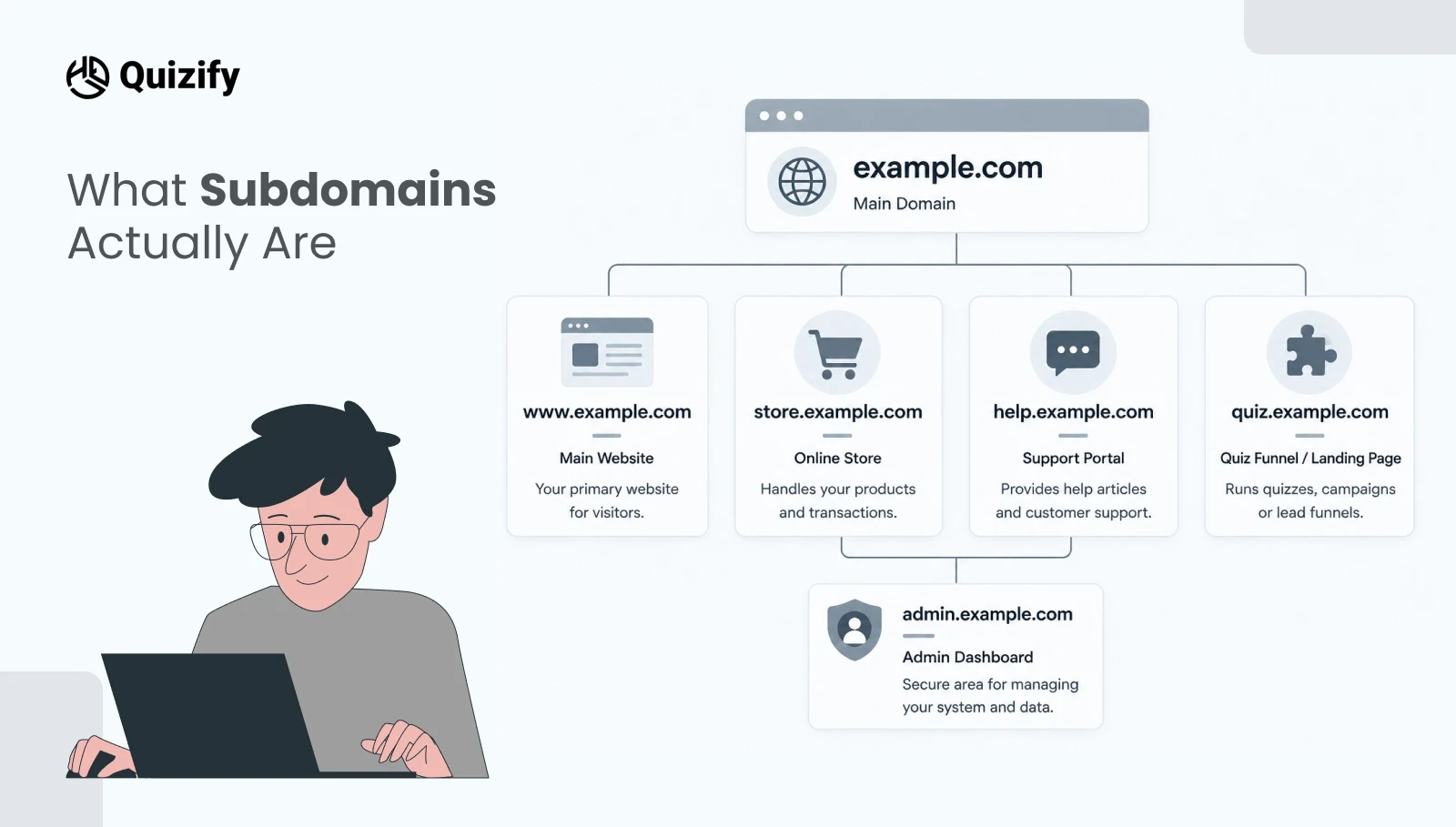
A subdomain is the part of a web address that comes before your main domain.
For example, in blog.example.com:
“blog” is the subdomain
“example.com” is the main domain
Brands use subdomains to separate different parts of their **website architecture**. For example:
store.example.com might be your shop
help.example.com might be your support portal
The main thing to understand is that subdomains can point to different places or systems. This means each one can do a different job. You can have subdomains for different things. For example one subdomain might show your marketing website. Another subdomain might run a quiz funnel or landing page. Another subdomain might be an admin dashboard.
This gives you flexibility as your product grows. It also helps you keep things organized without changing your domain.
What a Shared Subdomain looks like
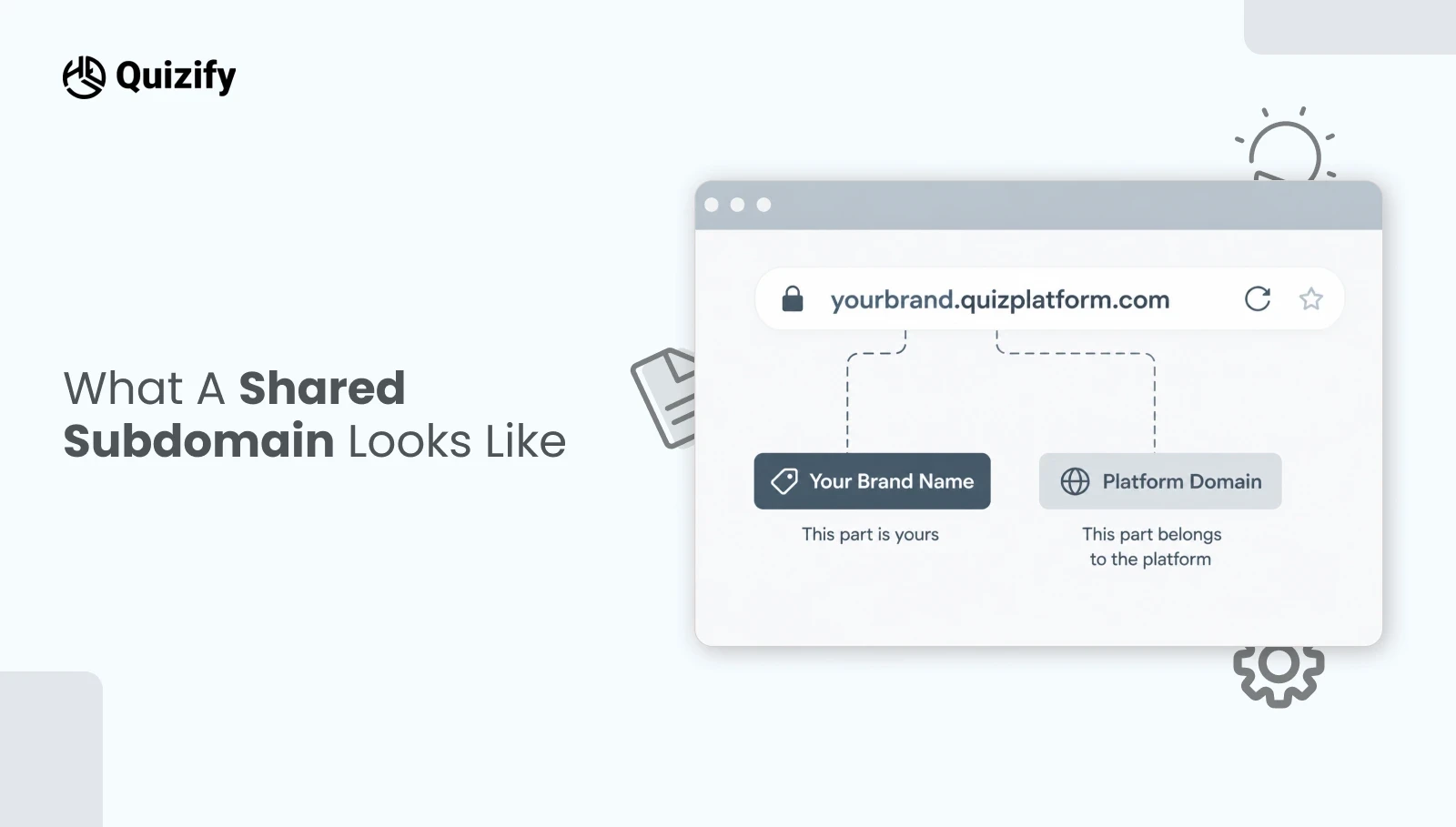
A shared subdomain is a web address that includes your brand name and the platform or SaaS tool you are using. It usually looks like this:
This is what happens when you use a no-code tool or SaaS platform that gives you a made URL. The platform owns the domain. You just get a subdomain with your brand name in it.
You do not need to set up DNS or buy anything extra. You do not need to involve IT. You can just sign up. Start using the link right away.
This is really useful when you want to move and get things done quickly with your marketing website and other subdomains, like your quiz funnel or landing page. It works well for things like landing pages, quizzes, funnels, A/B tests, small campaigns, or MVP testing, because you can launch in minutes and don’t risk affecting your main website or SEO setup.
The downside is that people can see you are using another company’s platform. For some brands, that’s fine or even helpful if the platform is trusted. But if you want everything to look fully branded and independent, this setup can feel less polished and weaker for brand identity and trust building.
What a Custom Subdomain looks like
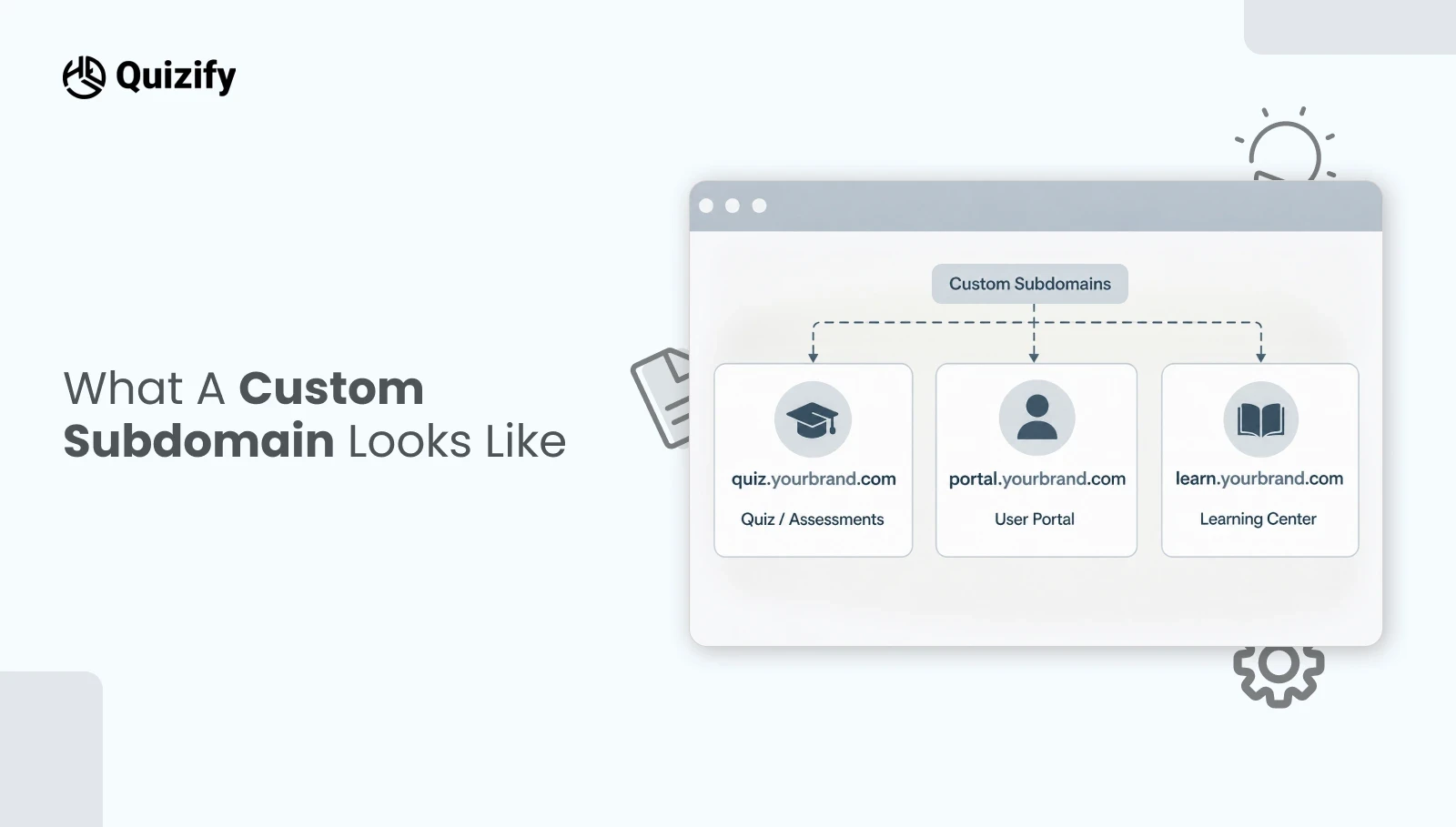
A custom subdomain is your own domain name, rather than your provider's.
You can see it looking like this:
Although the tool or platform is still powering everything in the background, the URL only shows your brand.
To set this up, someone would need to update your domain settings (DNS) and connect the subdomain to the provider. Usually, it is done only once and then it keeps going automatically.
For users, this would seem like an integral part of your website. Even if they move from www.yourbrand.com to quiz.yourbrand.com, it still appears to be the same company. This is Mostly useful in building trust when users log in, share information or make payments.
The problem is that you have to do more setup work. You will probably need a tech person to help you connect the domain and it can take some time to configure.
How these choices affect the way you launch
When you create a funnel, survey, or onboarding flow, choosing the type of subdomain will be reflected in how soon you can be live.
Shared subdomain is a way to launch super fast. Once you sign up and create the experience, you get an instant link that you can share. This suits well for quick work like tests, betas, or short-running campaigns where speed is the primary concern.
A custom subdomain will require one extra step in the setup process. You select a domain name like quiz.yourbrand.com, make the connection through your domain settings, and then link it to your tool. The only difference is that the URL is fully branded. This is more suitable for significant, long-lasting parts of your business.
Some teams find both options useful:
Launch with a shared subdomain for rapid concept validation
Move to a custom subdomain when the concept proves successful and becomes a priority. In doing so, you benefit from the speed of quick launches and the refinement of the fully branded experience at the right time.
How They Shape Brand Perception
People don’t usually think about “subdomains,” but they do notice the web address they click.
If someone clicks a link from your brand and suddenly sees a different company name in the URL, they may pause and wonder if it is safe or if they were sent somewhere else. Even if everything is secure and genuine, a sudden change can create doubt in brand trust and credibility.
A shared subdomain is usually fine for small brands, early-stage products, or communities that already trust you. It shows you are using a known SaaS tool, and in some cases that can even feel familiar or reliable.
As your brand grows, you often want your own name to appear everywhere. A custom subdomain helps with that. It keeps everything under one brand name—your website, quizzes, portals, and support pages all feel connected. This consistency builds trust and makes your brand look more professional and established over time.
Shared vs Custom Subdomain: SEO, Analytics and Email Links
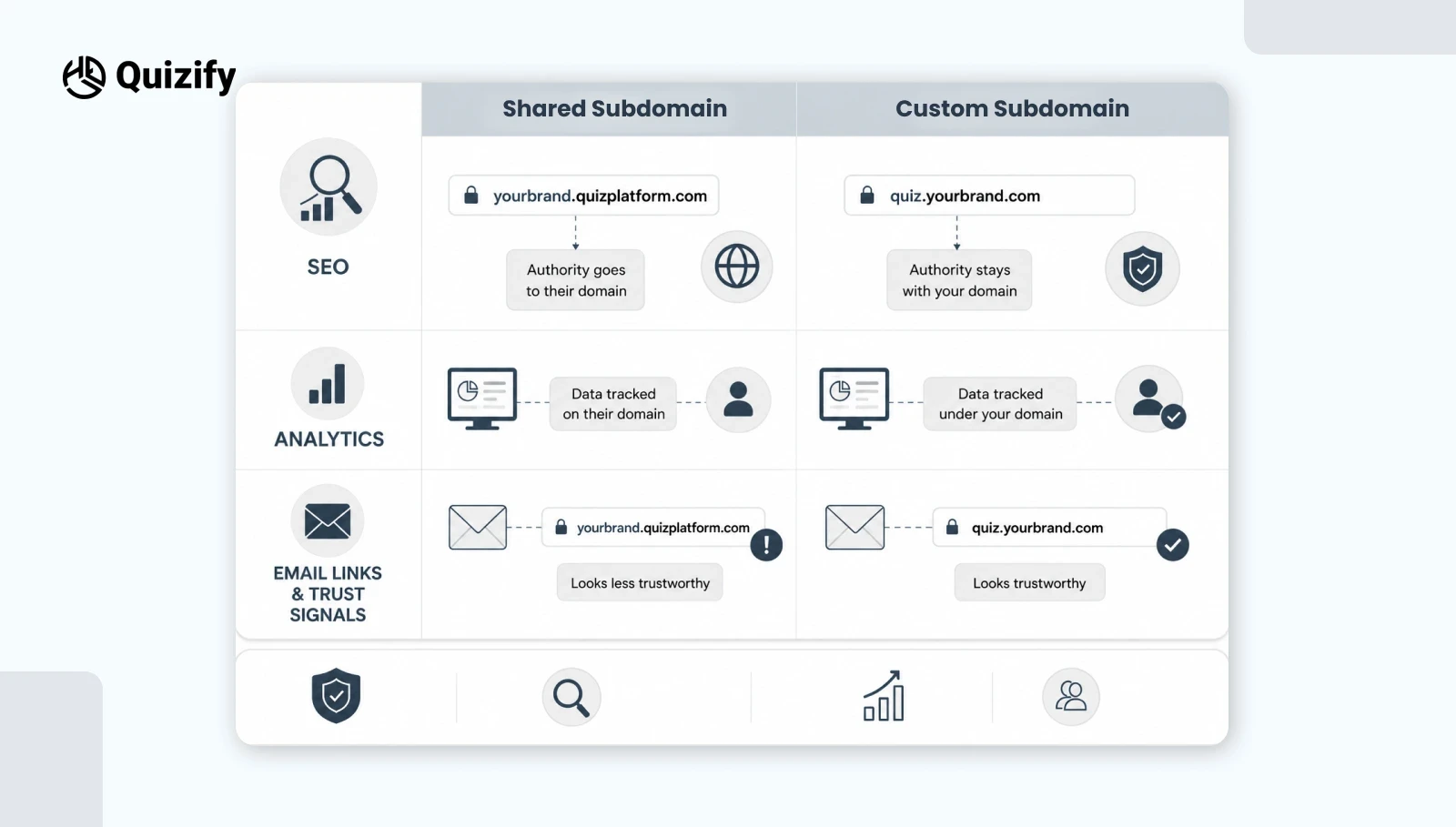
Subdomains also matter for how your data tracking, SEO performance, and email trust signals work.
With a shared subdomain, your pages sit on the provider’s domain. They may still show you analytics, but from a search engine optimization (SEO) point of view, much of the authority is tied to their main domain, not fully to your brand domain.
With a custom subdomain, everything stays under your own domain (like yourbrand.com). This helps search engines understand that the content belongs to you. It makes your SEO performance and domain authority better. Everything is grouped under your domain making it easier to track analytics.
Email is also important. When someone gets an email from you and clicks a link that stays within your domain it feels right and safe.. If the link takes them to a different company's domain some users might get suspicious. They might think it's spam.
Keeping email links and your website under the domain helps build trust. It also reduces confusion.
FAQS
1. Am I able to start with a shared subdomain and change it later?
Absolutely. A lot of brands use a shared subdomain at the very beginning to be able to launch quickly and then once the product gets more attention they can switch to a custom subdomain. The switch consists of usually setting up the new subdomain in DNS, directing it to the same tool, and redirecting the old one so the users will be taken to the new one.
2. Is SEO affected negatively by sharing a subdomain?
Not directly, no. Most SEO value is linked to the domain, not yours. A custom subdomain helps keep SEO value with your brand. It also boosts your brand presence and SEO plan.
3. What would be a simple way to explain this to non-technical people?
You could say that a shared subdomain is like renting a place in someone else's building while a custom subdomain is like having a space with your own brand. Both can work but the custom one is more linked to your brand.
4. In what situation does a shared subdomain become the preferred option?
Choose a shared subdomain if you want speed and simplicity more than branding. It’s good for tests, prototypes, internal tools or short campaigns. You want to launch and get results.
5. What are the things to be considered before going for a custom subdomain?
You will need to have access to your domain settings, decide who will be the manager, learn about SSL or security setup, and have a clear naming
convention so that future projects will be consistent.
Join our newsletter list
Sign up to get the most recent blog articles in your email every week.
Similar Topic